

TL;DR
- Power BI Pro costs $14/user/month, and PPU costs $24/user/month, a change that took effect April 1, 2025, and remains current pricing in 2026.
- The right Power BI license depends on three things: who creates, who consumes, and where content is hosted.
- Free users can view reports without a paid license only inside F64 or larger Fabric capacity workspaces, with the Viewer role assigned.
- P-SKUs are being retired. Microsoft advises all new and existing customers to move to Fabric F-SKUs.
- This guide covers all Power BI license types, verified Power BI license cost figures, and every enterprise edge case.
Quick Answer
Power BI licenses come in four tiers: Free, Pro ($14/user/month), Premium Per User ($24/user/month), and Microsoft Fabric capacity (F-SKUs billed by Capacity Units). Choosing the right Power BI license type depends on user roles, content location, and viewer volume.
Which Power BI License Type Do You Actually Need?
Understanding Power BI license types starts with user roles, not feature lists. The Power BI license cost you pay should match what each group actually does, not what might be theoretically useful.
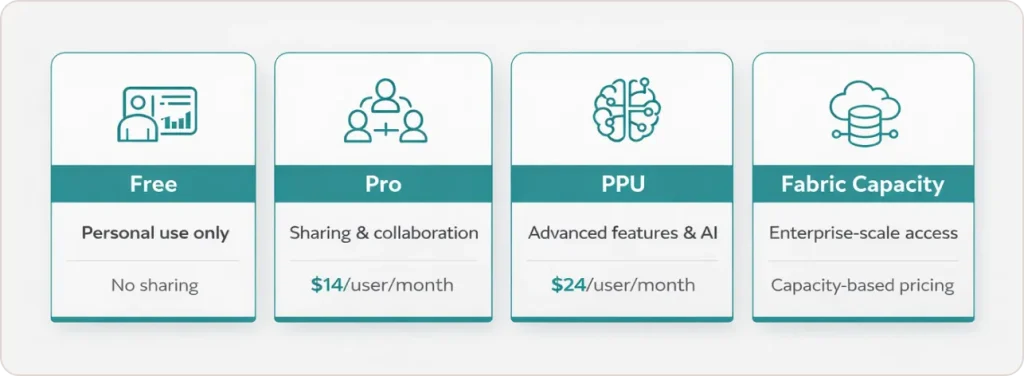
Here is how each Power BI license type maps to real enterprise roles:
Free gives access only to personal workspaces. Users can create and view their own content, but cannot publish to shared workspaces or share with colleagues. Useful for individual exploration only.
Pro ($14/user/month) is the baseline paid Power BI license. It is required to publish to shared workspaces, collaborate, share reports, and invite external guests. Any creator or publisher needs this tier.
Premium Per User or PPU ($24/user/month) adds paginated reports, 48 daily data refreshes instead of 8, AI capabilities, deployment pipelines, and large dataset storage. In a PPU workspace, all users accessing that content need a PPU license too. The exception: if that content is moved to a Fabric F64 or Premium capacity workspace, Pro and Free users can access it under the standard capacity rules.
Microsoft Fabric Capacity (F-SKUs) is a pooled compute model billed by Capacity Units (CUs). It unlocks Free-tier viewing for large populations at F64 and above, supports all Power BI Premium features, and enables Fabric workloads like Lakehouse and Data Factory. This model replaced Power BI Premium per capacity (P-SKUs), which Microsoft is actively retiring.
“The number one licensing mistake I see in enterprise Power BI rollouts is buying Pro licenses for viewers. Once you understand that capacity changes the access rules for Free users, the cost model shifts completely.” — Arun Ulag, Corporate Vice President, Azure Data, Microsoft
Power BI License Comparison: All Tiers Side by Side
This table covers every capability enterprises evaluate when comparing Power BI license cost and fit. All data verified against Microsoft’s pricing page and Microsoft Learn documentation, April 2026.
| Capability | Free | Pro ($14/user/mo) | PPU ($24/user/mo) | Fabric Capacity (F64+) |
|---|---|---|---|---|
| View reports in shared workspaces | No | Yes | Yes | Yes (Free user, Viewer role required) |
| Publish to shared workspaces | No | Yes | Yes | Requires Pro or PPU |
| Paginated reports | No | No | Yes | Yes |
| Daily data refreshes | 8 | 8 | 48 | 48+ |
| AI features (AutoML, Cognitive Services) | No | No | Yes | Yes |
| Deployment pipelines | No | No | Yes | Yes |
| Large dataset storage | No | No | Yes | Yes |
| External guest sharing (Entra B2B) | No | Yes (can invite) | Yes | Via B2B rules |
| Fabric workloads (Lakehouse, Spark, etc.) | No | No | No | Yes |
| Included in Microsoft 365 E5 | No | Yes | No | No |
The row most enterprises miss: publishing to shared workspaces still requires Pro or PPU even when Fabric capacity is in place. Capacity removes the per-user viewing requirement for consumers. It does not remove the publishing requirement for creators. This is the most common post-deployment surprise in enterprise Power BI license rollouts.
If your organization runs Microsoft 365 E5 or Office 365 E5, Power BI Pro is included at no extra cost. Verify this before purchasing any standalone licenses. Many creator populations are already covered.
What Is the Current Power BI Pricing in 2026?
Power BI Pro license cost is $14 per user per month (paid yearly). Power BI Premium Pricing for the PPU tier is $24 per user per month (paid yearly). Both prices were set effective April 1, 2025, per Microsoft’s official pricing announcement, and remain unchanged as of April 2026.
Any business case or budget built before April 2025 using the old prices of $10 Pro and $20 PPU understates your Pro license cost by 40% and your PPU cost by 20%. Many third-party guides and calculators still show outdated Power BI pricing, which creates real procurement errors.
Renewal rules that still apply in 2026: existing Enterprise Agreement customers keep their contracted Power BI pricing until their agreement renews. Microsoft 365 E5 and Office 365 E5 annual subscriptions were not affected by the April 2025 price change. Standalone Power BI agreement renewals pick up the current rates at renewal.
For Fabric capacity, Power BI cost shifts to a Capacity Unit (CU) model billed per Azure region. Fabric Capacity Reservations offer a 40.5% saving over pay-as-you-go pricing, per Microsoft’s pricing page. The critical planning threshold remains F64, covered in the next section.
When Can Free Users View Reports Without a Pro License?
Free users can view Power BI reports without a paid license only when the report and its underlying semantic model are both hosted in a workspace backed by an F64 or larger Fabric capacity SKU, and the user holds Viewer role on that workspace.
Both conditions must be met. This rule is documented explicitly in Microsoft Learn’s Fabric licenses guide: “To view Power BI content with a Microsoft Fabric free per user license, your capacity must reside on an F64 or larger SKU, and you need to have a viewer role on the workspace.”
Moving the report but leaving the semantic model in a non-capacity workspace is the most common reason “upgrade to Pro” prompts appear even after Fabric capacity has been deployed. Both the report and its data source workspace need to be on the qualifying capacity.
This rule changes the Power BI license cost math dramatically for large organizations. With 500 viewers and 50 creators, you do not need 500 Pro licenses at $14 each. You need Pro for the 50 creators and F64 capacity to serve the 500 viewers through Free-tier access. The break-even between per-user Pro licensing and F64 capacity typically falls around 150 to 200 viewers in standard US Azure regions, though this varies by region’s CU pricing.
How Do You Map Users to the Right Power BI License?
Start with a role audit before evaluating Power BI license types or running any cost model. In most enterprises, the user population splits into three groups.
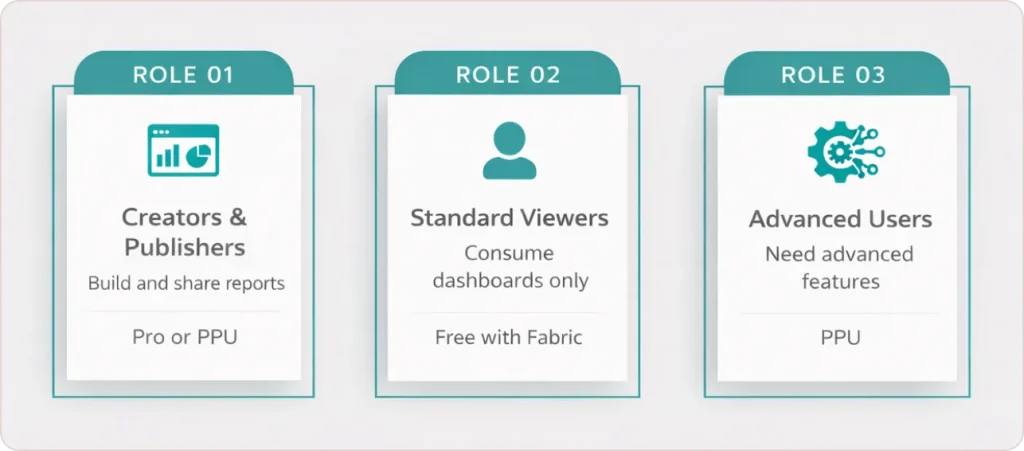
Creators and publishers are roughly 10 to 20 percent of Power BI users. They build reports, manage datasets, configure workspaces, and share content. Every one of them needs Pro or PPU. If advanced features like paginated reports or AI capabilities are required at this level, PPU is the right Power BI license tier.
Standard viewers are usually 70 to 80 percent of the total user population. They open dashboards, filter reports, and consume insights. They never publish. If content lives in F64 or larger Fabric capacity, these users can run on Free licenses. This is where the largest Power BI license cost savings in enterprise deployments actually live. Our Power BI consulting services team routinely finds organizations paying Pro rates for viewer populations who never needed it, simply because no one audited roles before purchasing.
Advanced feature users are a smaller middle group who need PPU for paginated reports, frequent data refreshes, or AI features. The key workspace rule: in a PPU workspace, everyone accessing content needs a PPU license. That changes if the content is moved to a Premium capacity or F64+ Fabric workspace, where the standard capacity access rules then apply instead.
How Does External User Access Work With Power BI Licenses?
External users can access Power BI through Microsoft Entra B2B, but Power BI licensing rules apply to both the inviting organization and the guest.
The person doing the inviting must hold a Pro or PPU license. The guest’s access then depends on one of three conditions: the content lives in Premium or Fabric capacity, the guest is assigned a Pro or PPU license, or the guest brings a qualifying Power BI license from their home organization (bring-your-own-license, or BYOL).
Microsoft’s Power BI licensing guide for organizations covers the guest licensing requirements alongside meaningful limitations that belong in any enterprise design conversation. Cross-cloud scenarios, such as between Azure Commercial and Azure Government tenants, carry additional constraints. Some Power BI experiences are explicitly unsupported for guests.
For large-scale external distribution where recipients are not Microsoft 365 users at all, the app-owns-data embedding model is the cleaner architectural choice. End users access analytics through a custom application and need no individual Power BI licenses. The licensing cost sits entirely at the capacity level rather than per user, with a service principal handling authentication.
What Is Happening With Power BI Premium Per Capacity (P-SKUs)?
Power BI Premium per capacity P-SKUs are being retired. Microsoft’s Fabric licenses documentation states: “New and existing customers should consider purchasing Fabric capacity subscriptions (F SKUs) instead.” The official Premium licensing update blog provides the full migration context and timeline.
The migration maps P-SKUs to F-SKUs by capacity level. F64 is broadly equivalent to P1, F128 to P2, and F256 to P3, per Microsoft’s SKU comparison table. Microsoft provides bulk migration tooling for large tenants handling workspace reassignment at scale.
If your organization still holds a P-SKU agreement, check your renewal date now. The migration, workspace reassignment, and testing process takes a meaningful time in large environments. Waiting until the renewal forces your hand creates unnecessary access risk.
Fabric capacity also unlocks workloads beyond Power BI, including Lakehouse, Data Factory, and Synapse Analytics, under the same capacity pool. Organizations evaluating a broader business intelligence consulting strategy that extends into data engineering and AI should factor this consolidation into their architecture plan.
How Should Enterprise Admins Govern Power BI Licensing?
License governance is where most enterprises incur unnecessary Power BI licensing costs, and where almost no guidance is spent.
Microsoft’s Power BI licensing guide for organizations documents the key admin controls. Billing Admins purchase and manage licenses through the Microsoft 365 admin center. License Admins and User Admins can assign and remove licenses, but cannot purchase them.
Self-service sign-up and self-service purchase should be disabled at the tenant level for most enterprise environments. If your company has a negotiated Enterprise Agreement with specific Power BI pricing, self-service purchases by individual users bypass that pricing entirely and create shadow licenses that are difficult to audit. Microsoft explicitly documents disabling self-service as a procurement and governance best practice.
For organizations in regulated environments, license governance connects directly to compliance requirements. Our healthcare analytics and financial services analytics industry pages cover the additional governance considerations specific to those sectors.
Conclusion: Three Decisions That Determine Your Power BI License Cost
Your next three steps before any Power BI licensing decision:
- Audit your user base and categorize each person as creator, advanced feature user, or viewer. That ratio determines whether per-user Power BI licenses or Fabric capacity gives you the lower total cost.
- Check whether your Microsoft 365 agreement already includes Pro. Many organizations buy standalone Pro licenses that they do not need.
- If you hold P-SKU agreements, confirm your renewal timeline and begin planning the workspace migration before it is forced.
Understanding Power BI license types is straightforward once you stop evaluating feature lists and start evaluating distribution. Creators need Pro or PPU. Viewers in large deployments are almost always cheaper to serve through Fabric capacity. Advanced users need PPU only if their requirements genuinely justify the Power BI cost premium over Pro.
The current Power BI pricing of $14 Pro and $24 PPU has been in place since April 2025 and remains unchanged in 2026. Any licensing decision made today should account for your broader Fabric strategy, not just immediate Power BI needs, because the capacity model you choose now determines what Fabric workloads you can run later.