

TL;DR
- Most cloud migrations fail the cost test because the strategy was built backwards. Assessment always comes before execution.
- A cloud migration strategy is a documented plan covering which workloads move, in what order, using which approach, and against what success criteria.
- According to Gartner, global public cloud spending is forecast to reach $723 billion in 2025, up 21.5% year over year. Organisations that delay migration are not being cautious. They are falling behind on cost efficiency and infrastructure agility.
- The 6 R’s framework determines which migration approach fits each workload. Choosing wrongly is the fastest way to spend more in the cloud than on-premises.
- This guide gives you a decision-ready framework with a pre-migration checklist, a provider comparison, and a clear action path.
Most cloud migrations do not fail because the technology is wrong. They fail because the strategy was assembled after the work started rather than before. Teams discover dependencies mid-wave, egress costs appear on the first invoice as a surprise, and the workloads that were supposed to save money end up costing more on cloud VMs than they did on dedicated servers.
I have seen this pattern across organisations in manufacturing, financial services, retail, and technology. The ones that get migration right share one behaviour: they treat the planning phase as the work, not as preparation for the work. This guide covers the framework, decisions, and checklist that separate migrations that deliver on their business case from those that derail halfway through.
Quick Answer
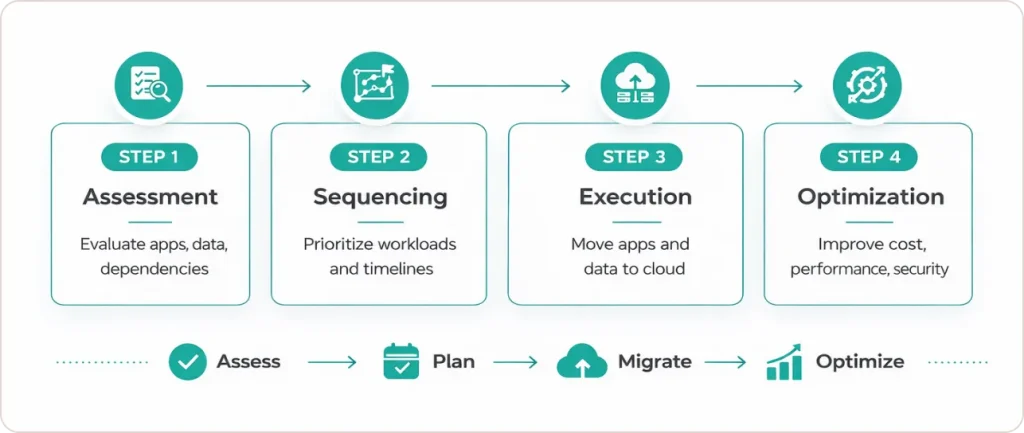
A cloud migration strategy is a structured, phased plan for moving applications, data, and workloads from on-premises or legacy environments to cloud infrastructure, covering assessment, sequencing, execution, and post-migration optimisation.
What Is a Cloud Migration Strategy, and Why Is It a Business Decision First?
A cloud migration strategy is a documented plan that defines which workloads move to the cloud, in what sequence, using which migration approach, and against what measurable success criteria. It connects business objectives directly to infrastructure decisions and ensures that finance, engineering, and operations teams are working from the same playbook throughout the programme.
The reason framing this as a business decision matters is that the cost of getting it wrong is a business cost, not just a technical one. Delayed migrations create technical debt. Rushed migrations produce over-provisioned cloud environments that cost more than the on-premises infrastructure they replaced. A migration without a strategy is an infrastructure disruption with no guaranteed return.
According to Gartner, global public cloud end-user spending is forecast to reach $723 billion in 2025, growing at 21.5% year over year. That growth is accelerated directly by AI and generative AI workloads, which require cloud infrastructure to operate at scale. Organisations building AI capabilities without a cloud migration plan in place are building on an incomplete foundation.
Gartner also predicts that 90% of organisations will operate hybrid cloud environments by 2027, meaning the question is no longer whether to migrate but how to migrate without creating the kind of sprawl that drives cost without value
“Cloud is about how you do computing, not where you do computing.”
Paul Maritz, CEO of VMware. BizTech Magazine, EMC World 2012
What Are the 6 R’s of Cloud Migration Strategy, and How Do You Choose the Right One?
The 6 R’s framework defines the six possible migration approaches for any given workload.
- Rehost (Lift and Shift): Move the application to cloud infrastructure without changing its architecture. Fastest to execute, lowest upfront cost, but leaves most of the cloud’s efficiency advantages unused. Best suited for stable legacy applications where refactoring budget is unavailable or unjustifiable in the short term.
- Replatform (Lift, Tinker, and Shift): Make targeted, low-risk optimisations before moving. A common example is migrating a self-managed database to a fully managed cloud service while keeping the application code intact. Delivers moderate cloud benefit with manageable execution risk.
- Repurchase: Replace an existing application with a cloud-native SaaS alternative. Frequently applied to CRM, ERP, and HR systems. Eliminates ongoing infrastructure and maintenance overhead, but requires change management investment and re-training.
- Refactor or Re-architect: Redesign the application specifically for cloud-native patterns, typically using microservices, containers, or serverless architectures. Highest long-term value and scalability. Highest upfront investment in time, cost, and engineering capability.
- Retire: Decommission applications that no longer serve an active business purpose. Every application retired reduces migration scope, licensing cost, and ongoing operational overhead. Most organisations discover during inventory that 10 to 20 percent of their estate qualifies for retirement.
- Retain: Keep specific workloads on-premises, at least for now. This applies to applications with hard regulatory constraints, extreme latency requirements, or recent significant capital investment that has not yet been recovered.
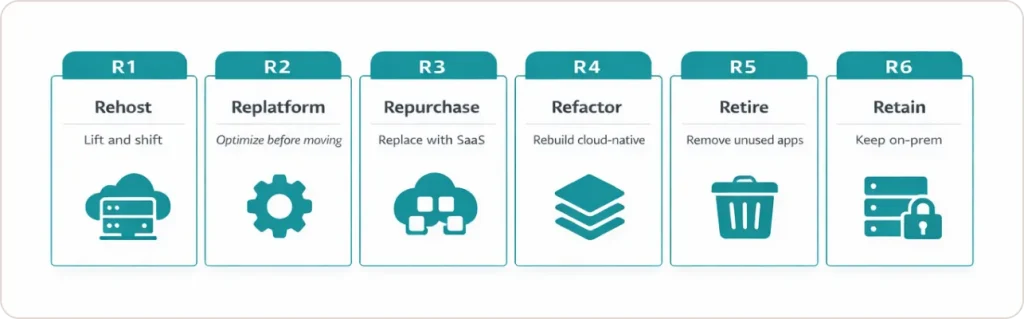
In practice, most enterprise migrations use a mix of all six approaches. A manufacturing organisation running 120 applications might rehost 60, replatform 25, retire 15, repurchase 10, retain 5, and refactor the remaining 5 that are core to their competitive differentiation. The allocation is dictated by the Cloud Readiness Assessment, not by a blanket policy.
How Do You Conduct a Cloud Readiness Assessment That Actually Drives Decisions?
A rigorous assessment covers four domains:
- Application inventory and dependency mapping: Catalogue every application, document its version, owner, and business function, and map all dependencies, including undocumented integrations. Undiscovered dependencies are the leading cause of migration-induced outages. Tools like AWS Application Discovery Service, Azure Migrate, or open-source alternatives such as Cartography can automate significant portions of this work.
- Infrastructure baseline: Capture actual utilisation data for CPU, memory, storage, and network traffic across all workloads. Cloud right-sizing is based on real usage patterns, not peak capacity allocations. Organisations that right-size using real baselines consistently see 25 to 40 percent lower cloud spend than those that mirror their on-premises provisioning.
- Security and compliance review: Identify data classification requirements, regulatory constraints including GDPR, HIPAA, and SOC 2, and existing access control models that must be replicated or strengthened in the cloud. This step cannot be retrofitted after migration. Compliance gaps discovered post-migration are expensive to resolve and may require re-migration of affected workloads.
- Organisational and skills readiness: Assess whether your engineering and operations teams have the cloud skills required to build, deploy, and operate in the target environment. A technology migration that outpaces team capability creates operational fragility. Skills gaps belong in the migration timeline, not in the post-incident review.
Cloud Readiness Assessment Checklist
- Complete application inventory with version, owner, and business function documented
- Dependency maps completed for all tier-1 and tier-2 applications
- Actual utilisation data captured (CPU, memory, storage, network) per workload
- Data classification and regulatory residency requirements documented per application
- Compliance constraints identified (GDPR, HIPAA, SOC 2, industry-specific)
- Cloud skills gap analysis completed across engineering and operations teams
- Total Cost of Ownership baseline established for pre-migration comparison
- Business continuity and disaster recovery requirements documented per workload
- Licensing audit completed across all software in migration scope
For organisations with complex data pipelines tied to on-premises infrastructure, the readiness assessment should also evaluate how data engineering workloads, including ETL pipelines, real-time data flows, and integration layers, will behave under a cloud-native architecture. Migration is the right time to fix pipeline inefficiencies rather than carry them forward.
What Are the 6 Cloud Migration Steps in a Proven Execution Plan?
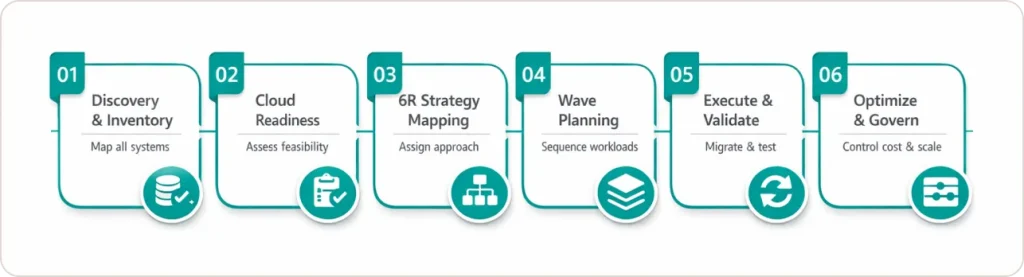
A cloud migration plan is a phased execution framework that moves your organisation from current-state assessment through to optimised cloud operations. The six steps below represent the sequence used by cloud architects across enterprise programmes and major system integrators. Each step has defined inputs, outputs, and handoff criteria.
1 Discovery and Inventory
Catalogue everything in scope. Applications, servers, databases, network configurations, third-party integrations, and licensing agreements all need to be documented before any migration decision is made. The output is a single source of truth for the entire programme. Shortcutting this step is the most expensive mistake in migration planning.
2 Cloud Readiness Assessment
Run the four-domain assessment described above. Score each workload against migration readiness criteria: business priority, technical complexity, dependency risk, compliance constraint, and team capability. This scoring directly determines wave sequencing.
3 Strategy Assignment Using the 6 R’s
Assign a migration approach to each workload based on the assessment scores, available budget, and business timeline. Document the rationale for each decision so that choices can be revisited without losing institutional context when team members change.
4 Migration Wave Planning
Sequence workloads into migration waves, starting with the lowest-risk applications. Wave 1 should build team confidence, surface process gaps, and produce real migration metrics before any business-critical workloads are moved. A common and costly mistake is beginning wave 1 with a core database or high-traffic customer-facing application.
5 Execution, Validation, and Cutover
Migrate each wave, validate functionality and performance against pre-defined benchmarks, and run parallel operation periods for high-risk workloads before cutting over completely. Every wave must have a documented and tested rollback procedure before the migration window opens. The rollback plan is not optional. It is the condition under which the migration is authorised to proceed.
6 Optimisation and Ongoing Governance
Migration is not the finish line. Post-migration optimisation, covering cloud cost governance, performance tuning, right-sizing reviews, and security posture hardening, typically delivers an additional 20 to 35 percent cost reduction on top of initial migration savings. This is where cloud economics actually materialise.
Organisations that have completed migration and are looking to layer advanced analytics and AI capabilities on top of their cloud infrastructure should explore Generative AI consulting services, which are built specifically to run on modern cloud data platforms.
How Do AWS, Azure, and Google Cloud Compare for Enterprise Cloud Migration?
The migration process is broadly consistent across cloud providers, but tooling maturity, ecosystem strengths, and pricing models differ in ways that affect both execution timeline and long-term total cost. Choosing a provider based on name recognition rather than workload fit is a structural decision that is expensive to reverse.
| Criteria | AWS | Microsoft Azure | Google Cloud |
|---|---|---|---|
| Migration tooling | AWS MGN, AWS DMS, MAP programme | Azure Migrate suite, Azure Arc | Migrate for Compute Engine, DMS |
| Market share (2024) | 31% (largest) | 20% | 12% |
| Microsoft / Windows workloads | Supported, requires configuration | Native, tightest integration | Supported, not a primary strength |
| Data analytics and AI | Strong (Redshift, SageMaker) | Strong (Synapse, Azure ML) | Industry-leading (BigQuery, Vertex AI) |
| Hybrid cloud capability | AWS Outposts (mature) | Azure Arc (broadest feature set) | Anthos / Google Distributed Cloud |
| Enterprise sectors served | All sectors, including financial services, government, healthcare | Strong in financial services, manufacturing, public sector | Strong in retail, logistics, media, data-intensive industries |
| Free migration support | AWS MAP program (qualifying workloads) | Azure Migration Program | Partner-dependent |
| Open source and Kubernetes | Strong (EKS, broad OSS ecosystem) | Moderate (AKS, growing investment) | Strongest (Kubernetes originated at Google) |
The most important principle in provider selection is workload fit over brand familiarity. If your organisation runs predominantly Microsoft workloads, Azure’s native integration with Active Directory, SQL Server, and the Microsoft 365 ecosystem reduces migration complexity significantly. If data analytics and machine learning are central to your business, Google Cloud’s BigQuery and Vertex AI ecosystem offers structural performance and cost advantages that compound over time.
For organisations in financial services or healthcare, where data governance and regulatory compliance are non-negotiable, exploring how cloud migration intersects with your sector’s specific requirements is essential. We work with organisations across financial services, healthcare, and manufacturing to align cloud and data architecture decisions with compliance requirements from the start.
What Should a Cloud Migration Checklist Cover Before Go-Live?
A cloud migration checklist is a pre-cutover verification tool that confirms each workload meets technical, security, and operational production-readiness criteria before go-live. It is not a bureaucratic formality. It is the mechanism that converts a migration plan into a migration with a controlled risk profile.
Pre-Migration and Pre-Cutover Checklist
- Migration strategy (the R) confirmed and signed off per workload
- Target cloud architecture peer-reviewed by a senior engineer not involved in the build
- Network topology, VPC, and subnet configuration documented and tested
- IAM policies defined, reviewed, and tested in a non-production environment
- Data encryption confirmed for data at rest and in transit per workload classification
- Backup and point-in-time recovery tested in the target environment before cutover
- Monitoring, alerting, and logging configured and validated before migration begins
- Performance baseline established for post-migration comparison
- Rollback procedure documented, tested, and approved per wave
- Licensing compliance verified for cloud deployment models
- Data egress costs modelled and included in total cost projections
- Business stakeholder sign-off on cutover window, blackout period, and communication plan
One item that organisations routinely omit from pre-migration checklists is data egress cost modelling. Cloud providers charge for data leaving their networks, and for organisations with large data volumes or multi-cloud architectures, egress costs can consume 15 to 25 percent of expected cloud savings. This must be modelled before migration begins, not discovered on the first invoice.
For organisations that have already migrated and need to build structured data quality and governance processes on top of their cloud platform, Data engineering services include data quality frameworks, governance policy implementation, and master data management as standalone or integrated engagements.
What Are the Cloud Migration Mistakes That Cause the Most Damage?
The most costly cloud migration mistakes are all preventable, and they all have the same root cause: decisions made without sufficient information from the assessment phase. Here are the four that most frequently convert a well-intentioned migration into a remediation project.
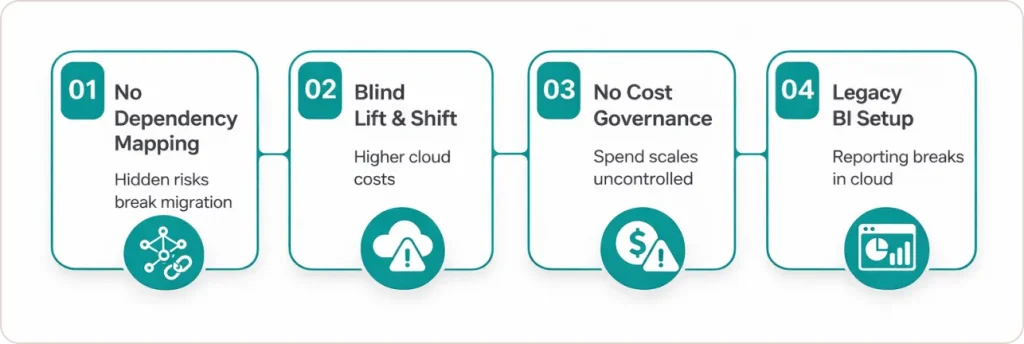
What happens when you skip dependency mapping?
Dependency mapping is the step most organisations try to compress to save time in the planning phase. When an undiscovered application dependency surfaces mid-migration, the team faces two equally bad choices: delay the wave or proceed without a validated rollback path. Either outcome adds cost and erodes stakeholder confidence in the programme. The time spent on thorough dependency mapping before migration begins is recovered immediately the first time a dependency issue is avoided.
Why does lifting and shifting without architecture review create cost problems?
A rehosted application running on cloud virtual machines is frequently more expensive than the on-premises server it replaced if the architecture is not adjusted for cloud pricing models. Cloud billing is based on consumption, not capacity. An application designed around peak-load dedicated hardware will run inefficiently and expensively in a cloud environment where you pay for what you use. Right-sizing requires reviewing compute, memory, and storage allocation against actual utilisation data, not against the original hardware specification.
Why do cloud migrations run over budget without cost governance?
Cloud infrastructure is elastic, which means spend is elastic too. Without resource tagging policies, budget alerts, and automated governance rules in place from the first day of cloud operation, cloud spend scales with every new workload that comes online. Organisations that build cost governance after migration often spend the first six months post-migration managing a cost overage problem rather than delivering optimisation value. Tagging and governance policies belong in the migration checklist, not in the post-launch retrospective.
What does poor post-migration BI and reporting infrastructure look like?
A significant but frequently overlooked problem is that organisations migrate their infrastructure to the cloud without rethinking how business intelligence and reporting systems connect to the new data environment. Legacy BI tools pointed at on-premises databases may not function correctly or efficiently against cloud data warehouses. This is the right moment to modernise the reporting layer. SR Analytics has helped organisations, including Convert.com, build cloud-native BI platforms using Google BigQuery and Looker, delivering 20 hours per week in automated reporting savings. See the full story in the Convert.com BI transformation case study.
Conclusion: The Decision That Determines Every Other Decision
Cloud migration is a business strategy question executed through technology. Every decision in this guide, from the 6 R assignment on a single workload to the wave sequencing across a 150-application portfolio, flows from the quality of the assessment that precedes it. Organisations that invest in the planning phase finish faster, spend less, and end up with infrastructure that actually serves their goals rather than infrastructure that merely exists in the cloud.
To summarise the framework in this guide: conduct a full Cloud Readiness Assessment before touching any workload. Assign a migration approach from the 6 R’s to every application, based on evidence from the assessment, not assumptions. Sequence waves from lowest to highest risk. Validate and establish rollback procedures before every cutover. Build cost governance on day one, not day sixty.
And critically, treat migration as the start of the modernisation journey, not the end of it. The organisations that get the most from cloud investment use it as the foundation for better data infrastructure, faster analytics, and the kind of AI capability that requires scalable, managed compute to run. We helps data-driven organisations connect their cloud infrastructure to their data analytics and business intelligence programmes so that the migration delivers measurable business value, not just a change of address for servers.